Travel
Korea eSIM 2026: The One Setup That Saves $20–40 and Skips the Incheon SIM Line
The payoff Facing a forty-deep SIM line at Incheon and a tourist-counter markup → already texting your hotel at passport control on an eSIM you set up mid-flight, roughly $20–40 saved and not a minute lost to the queue.
📈 Trend signal: Korea eSIM adoption 2026 (online purchase overtaking airport pickup)
Here’s the promise up front: do one thing before you fly — buy your data online and install it on the plane — and a Korea eSIM lands 20–40% cheaper than the SIM counter at Incheon, which works out to roughly $20–40 saved on a one- to two-week trip, while getting you online before you even reach passport control. No arrival queue, no paperclip, no counter markup.
The moment that made me write this: last spring I landed at Incheon at 9 p.m. and stood in a SIM-counter line forty people deep while travelers who’d bought an eSIM online walked straight past me to the trains, already texting their hotels. I was still holding my passport — and, I worked out later, paying a tourist-counter premium for the privilege.
2026 is the year that flipped. eSIM adoption tipped over — buying data online now beats the airport SIM counter on price and skips the arrival queue entirely. So here’s the one-line rule before we get into the weeds: don’t stand in the Incheon SIM line — buy online before you go and set it up on the plane.
This guide contains affiliate links — if you buy through them we may earn a small commission at no extra cost to you.
Traveling with a family, several devices, or a phone that cannot use eSIM? Start with our Korea Pocket WiFi vs Physical SIM guide instead. This page is for choosing and setting up an eSIM on one person’s compatible phone.
eSIM vs physical SIM vs pocket WiFi
There are three real options for getting online in Korea, and the right one depends on your phone and your group size. I built this table from 2026 street pricing so you can compare on the thing that actually matters — cost per day — instead of the sticker price.
| Option | Typical 2026 price | Cost per day | Setup | Best for |
|---|---|---|---|---|
| eSIM 5-day | ~$19–23 | ~$3.80–4.60 | Scan a QR code, no counter | Solo, modern phone |
| eSIM 10-day | ~$27–32 | ~$2.70–3.20 | Same | Most tourists |
| eSIM 30-day | ~$38–46 | ~$1.30–1.50 | Same | Long stays, digital nomads |
| Physical USIM 5-day | ~$21–25 | ~$4.20–5.00 | Swap the card, or collect at Incheon | Older phones, need a local number |
| Pocket WiFi | ~$4–6/day + deposit | ~$5–6 split by group | Airport counter pickup/return | Groups of 3+ |
(Pricing bands cross-checked against justktravel’s 2026 Korea connectivity guide.)
The pattern jumps out immediately: the longer your trip, the more an eSIM wins. A 30-day eSIM lands around $1.30–1.50 a day, which nothing else touches. The physical USIM only makes sense in two cases — an older phone that can’t do eSIM, or when you need a Korean phone number for things like local delivery apps.
Pocket WiFi is the one exception to “eSIM always wins.” For a family or group of three or more, one rented WiFi egg split four ways can beat four separate eSIMs — everyone shares the connection. The catch is you’re all tethered to one battery-powered box, so nobody can wander off. If that’s you, this is the group play: rent a pocket WiFi egg with airport pickup on GetYourGuide.
Does your phone support eSIM? (30-second checklist)
Before you buy anything, confirm your phone can actually run an eSIM. Run through this:
- iPhone: XS, XR or newer (2018+). Open Settings → General → About and scroll to “Available SIM.” If it lists an EID number, you’re good.
- Samsung Galaxy: S20 or newer, Z Flip/Fold series, most 2020+ Android flagships.
- Google Pixel: Pixel 3 or newer (some early carrier variants excluded).
- The universal test: dial
*#06#. If an EID appears alongside your IMEI, your phone supports eSIM. - The dealbreaker: your phone must be carrier-unlocked. A phone still locked to your home carrier will reject a Korean eSIM even if the hardware supports it.
Buy online vs buy at Incheon — the real trade-off
This is the crux of the whole decision, so let me be blunt about it.
Buying online (before you fly) is cheaper per day, activates in minutes, and — crucially — means you’re connected the second the plane’s doors open. No line, no counter, no fumbling with a paperclip over a trash bin. This is where the $20–40 comes from: walk-in tourist SIMs at Incheon commonly run about $33–41 for 10 days and $52–67 for 30 days, while a comparable data-only eSIM bought online is roughly 20–40% less (cross-checked across 2026 connectivity guides). On a one- to two-week trip that gap is usually $20–40 straight back in your pocket — plus the 20–40 minutes you’d otherwise lose in the arrivals-hall queue at peak season.
Buying at Incheon has exactly one advantage: a human hands you the card and troubleshoots on the spot. That’s genuinely reassuring if this is your first eSIM. But you pay for it in both money and time, and here’s the part almost nobody mentions: the cheap airport-only 7-day and 15-day tourist SIMs can’t be pre-ordered. They only exist at the counter. So if you’re set on the rock-bottom airport SIM, you have to queue for it — there’s no way to skip ahead.
My rule of thumb, and the simple decision flow I give friends:
Does your phone support eSIM? Yes → buy an eSIM online before you fly. Install it on the plane. Done. No (older or locked phone) → pre-order a physical USIM online and choose “collect at Incheon,” which is still cheaper than buying cold at the counter. Traveling in a group of 3+? → price out one pocket WiFi against separate eSIMs; the WiFi egg often wins.
Cost-per-day at a glance (2026 street pricing) — the number that actually decides it:
| Plan | Cost per day |
|---|---|
| eSIM, 30-day | ~$1.30–1.50 ← cheapest |
| eSIM, 10-day | ~$2.70–3.20 |
| eSIM, 5-day | ~$3.80–4.60 |
| Physical USIM, 5-day | ~$4.20–5.00 |
| Pocket WiFi (split by group) | ~$5–6 |
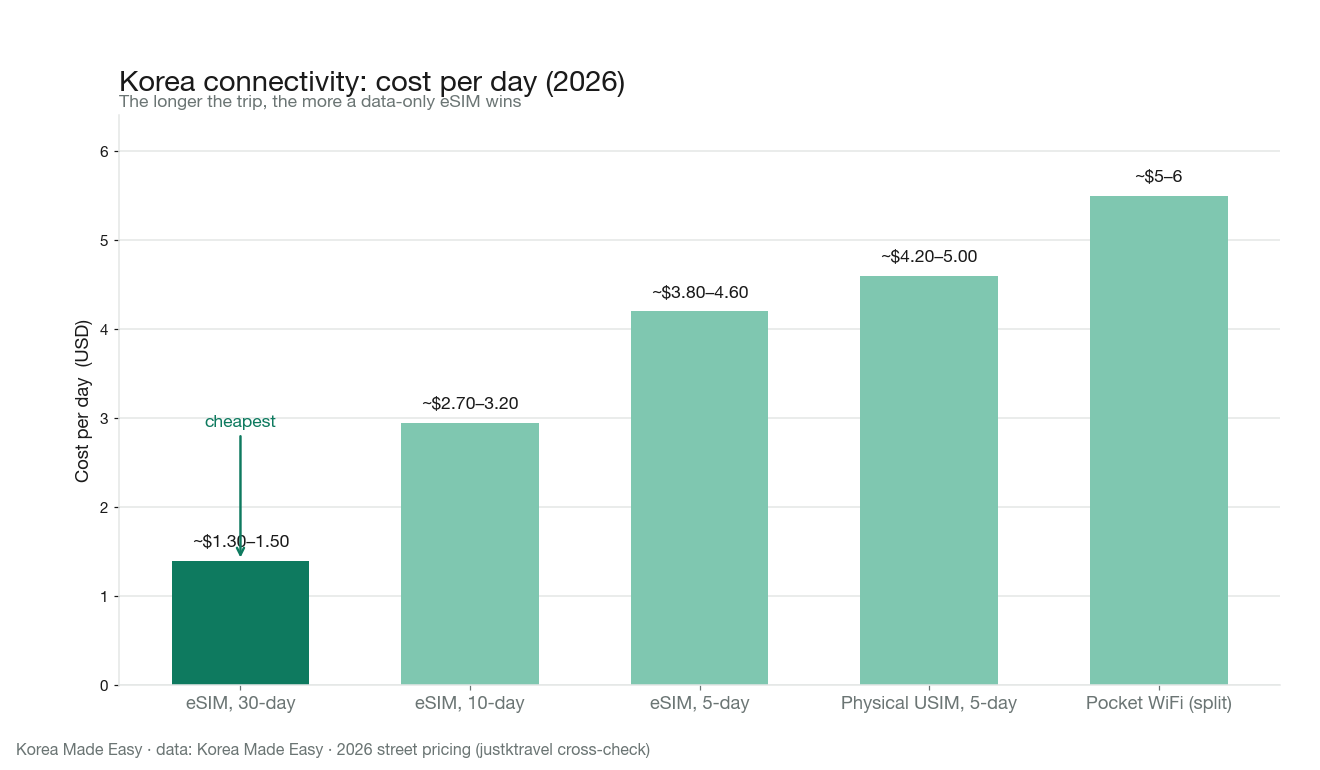
The longer you stay, the more a data-only eSIM pulls ahead. A USIM or WiFi egg only wins in the two edge cases above (older/locked phone, or a group of 3+).
Our best-value pick and who it’s for
For the vast majority of visitors — a solo traveler or a couple, on a modern unlocked phone, staying 5 to 15 days — the sweet spot is a data-only tourist eSIM in the ~$3-a-day range. It’s cheaper than the airport SIM, it covers the classic itinerary of a Seoul base plus a side trip to Busan, and you never touch a counter. Every one of these providers is just reselling capacity on Korea’s three carriers (SK Telecom, KT, LG U+), so coverage is excellent across the board — you’re really choosing on app, price, and support.
Four names worth comparing (all prices approximate and worth re-checking at purchase, since promos shift):
- Airalo — the safe default. The most established travel-eSIM brand, live in 200+ countries, so if you already trust one name, it’s this. Korea data plans run roughly the ~$5 (1 GB) to ~$30 (20 GB / 30 days) range. Best for first-timers who want a known quantity.
- Saily — my primary pick for most trips. Built by NordVPN, it has the cleanest app and auto-activates when you land. A mid-size plan (around 5–10 GB) tends to undercut Airalo by a few dollars, roughly ~$11 for 5 GB / 30 days. Best price-to-polish ratio for a standard 1–2 week visit.
- Ubigi — best on bigger/rechargeable plans. Strong value once you need 10 GB+ (about ~$14 for 10 GB), and you can top up rather than rebuy. Good for longer or data-heavy stays.
- Holafly — only if you want truly unlimited. Flat unlimited-data plans (about ~$2–3 a day) with no counting; the trade-off is a daily fair-use cap. Best for heavy streamers and laptop hotspotters.
- Yesim — the flexible option I’ve linked below. Data-only plans across 150+ countries on the same three Korean carriers as everyone else, with a simple app and a long buy-ahead window. Rates shift with promos, so it’s worth a live price-check against Saily and Airalo before you commit.
Here’s the same five at a glance — every one rides Korea’s SK Telecom / KT / LG U+ networks, so this is a choice about app, price, and support, not coverage:
| Provider | Best for | Rough Korea price | The catch |
|---|---|---|---|
| Saily | Best everyday value + cleanest app | ~$11 / 5 GB / 30 days | Newer brand (NordVPN-built) |
| Airalo | Safest known name for first-timers | ~$5 (1 GB) – $30 (20 GB) | A dollar or two pricier mid-range |
| Yesim | Flexible plans, long buy-ahead window | Promo-based — price-check live | Rates swing with promos |
| Ubigi | Bigger / rechargeable data (10 GB+) | ~$14 / 10 GB, top-up instead of rebuy | Overkill for a short trip |
| Holafly | Truly unlimited data | ~$2–3 / day, unlimited | Daily fair-use speed cap |
Prices are approximate and shift with promos — re-check at purchase. All five install from a QR code in ~2 minutes.
My call: start with Saily for the best everyday value, or Airalo if you’d rather buy the most recognized brand — both install from a QR code in about two minutes. Grab Airalo’s Korea eSIM directly, or check live Korea eSIM plans on Yesim to compare prices side by side before you land.
Who should not buy this: heavy streamers who want truly unlimited high-speed data (size up to Holafly’s unlimited plan), and anyone needing a Korean number (get a physical USIM instead). And if you’re moving to Korea rather than visiting, an eSIM is only a bridge until your ARC arrives — our Seoul cost-of-living guide covers switching to a cheap MVNO plan after that.
How to install and activate (step-by-step)
Do steps 1–4 at home on WiFi. Do step 5 when you land.
- Buy online and wait for the confirmation email with a QR code.
- On WiFi at home, go to Settings → Cellular/Mobile → Add eSIM (iPhone) or Settings → Connections → SIM Manager → Add eSIM (Samsung).
- Scan the QR code from the email. The eSIM downloads and installs as a second line. Do not delete your home SIM.
- Label the lines — name the Korea eSIM “Korea” and leave data off for now so it doesn’t start counting.
- When you land at Incheon, open Settings, switch your data line to the Korea eSIM, turn on data roaming for that line only, and toggle Airplane mode off. You’ll connect in under a minute.
That’s it. The reason to do steps 1–4 before departure is simple: scanning a QR code needs internet, and you won’t have any at the gate in Korea. Set it up on the plane’s WiFi or at your home airport, and arrival becomes a single toggle. With your data sorted, the only other thing to grab in your first thirty minutes on the ground is a T-money transit card for the subway and buses — the two-step arrival setup that gets you moving.
How much data do you actually need?
People wildly overbuy. A realistic daily budget for a tourist using maps, messaging, and the occasional video:
- Light (maps, KakaoTalk, web): ~0.5 GB/day → a 3–5 GB plan covers a week.
- Average (add social media, some YouTube): ~1 GB/day.
- Heavy (streaming, laptop hotspot): 2 GB+/day → get an unlimited plan.
For a standard 7–10 day trip, 5–10 GB is plenty. Korea also has excellent free WiFi in cafés, subways, and hotels, so your eSIM does less work than you’d think.
 Read next →Don’t book the wrong Seoul neighborhood — the mistake that wastes an hour of subway a day
FAQ
Can I keep my home phone number while using a Korea eSIM? Yes — that’s the whole point of eSIM. Your physical home SIM stays in the phone for calls and texts; the Korea eSIM handles data. Just keep the home line’s data switched off to avoid roaming charges. Ready to set it up? Compare Korea eSIM plans on Yesim and buy before you fly.
Can I tether / hotspot from a Korea eSIM? On most tourist eSIMs, yes — hotspot works fine for sharing to a laptop or a travel companion’s phone. Confirm it’s allowed on the specific plan before buying, and remember hotspotting burns data fast, so size up if you’ll do it daily.
What about refunds if I buy the wrong plan? Policies vary by seller, but the general rule is: an unactivated eSIM (QR code never scanned) is usually refundable, while an activated one is not. So don’t scan the QR until you’ve confirmed the dates and data are right — that’s your safety window.
Planning Your Korea Trip? Compare Your Options
Compare transport, mobile data, and attraction options. Prices and eligibility depend on your selected date and package.
AREX Incheon ↔ Seoul Express
Express train between Incheon Airport and Seoul Station. Follow the selected voucher’s seat reservation and redemption instructions.
Check AREX Express Tickets →Korea eSIM Options
Compare Korea eSIM search results. Check data allowance, supported network, device compatibility, activation, and speed limits.
Compare Korea eSIM Options →WOWPASS Card (Pay + T-Money)
Compare WOWPASS and T-money. Payment and transit balances are separate; check issuance, top-up, exchange, and withdrawal fees.
Read WOWPASS vs T-money →Top Seoul Passes & Day Tours
Browse general Seoul activity search results. This is not a guaranteed-entry pass or a fixed-discount offer; check each product’s inclusions.
Browse Seoul Activity Options →Sources
- https://gohub.com/blog/esim-korea-buy-online-vs-incheon-airport-2026
- https://justktravel.com/best-sim-card-esim-or-pocket-wifi-for-korea-2026-tourist-guide/
- https://inmykorea.com/esims-korean-sim-card-tourists-incheon-airport/
Search-trend data from Google Trends (KR) and Naver DataLab. This article is independent commentary and is not affiliated with any broadcaster, agency, or the individuals mentioned.