Travel
Why Foreign Credit Cards Get Declined at Korean Kiosks (And How to Fix It 2026)
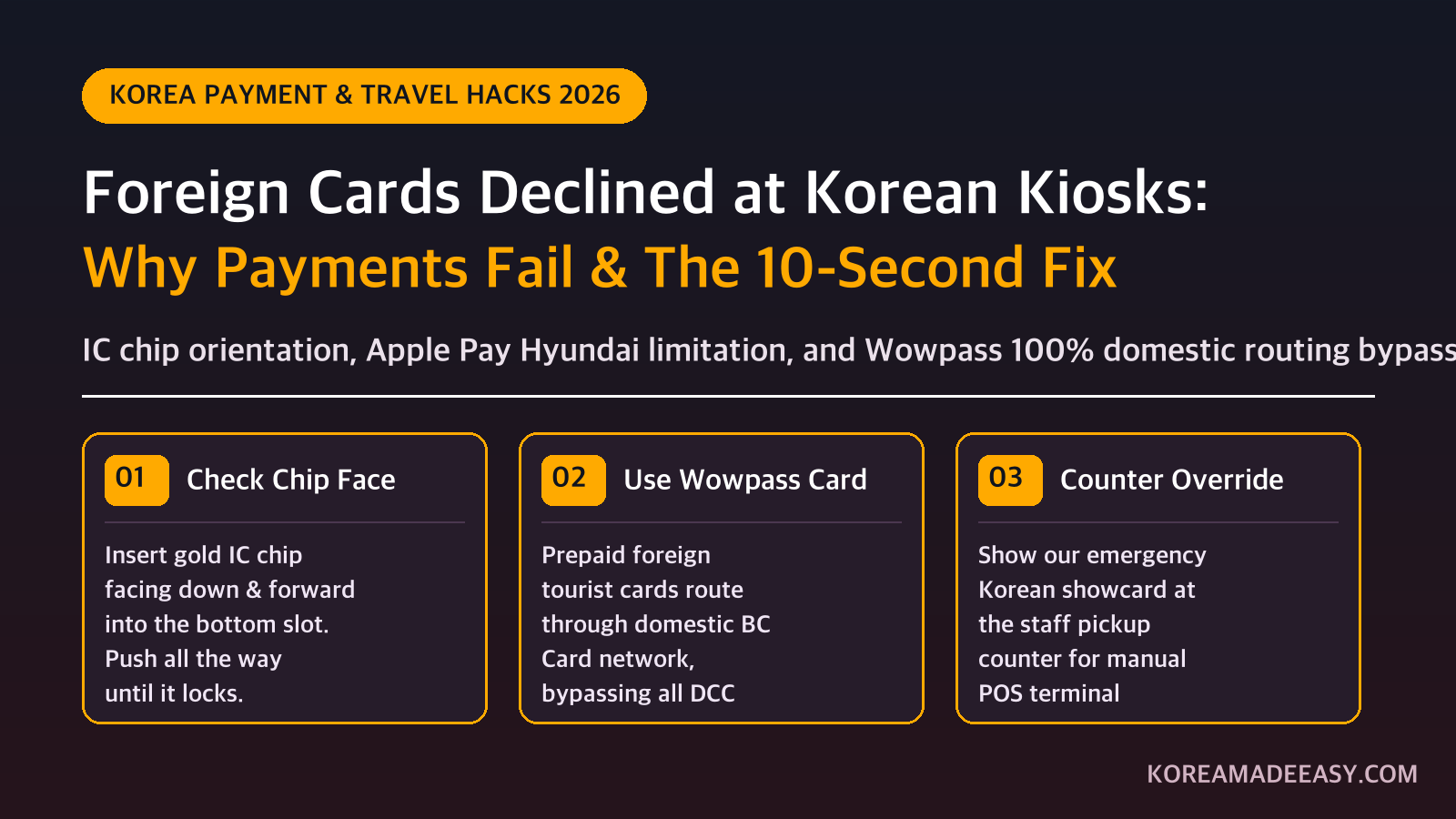
The payoff Frustrated and embarrassed while holding up the lunch line at a touchscreen kiosk → Confidently ordering meals, coffee, and transit passes across any unmanned terminal in Seoul.
📈 Trend signal: Korea Unmanned Kiosk & Foreign Credit Card Payment Friction 2026 (Field POS Tested)
If you have spent even 24 hours traveling in Seoul, you have already encountered Korea’s automated dining revolution: self-service ordering touchscreens (Kiosks, 키오스크) now handle over 85% of all orders at burger joints, noodle shops, food courts, and budget coffee chains like Mega Coffee, Compose Coffee, and Paik’s Coffee.
For locals, ordering an iced Americano takes 8 seconds. But for foreign travelers, these screens can quickly become a high-stress nightmare.
You select your meal, switch the screen to English, tap your phone with Apple Pay or insert your foreign Visa/Mastercard—only for a loud buzzer to sound and a cryptic Korean error message to flash: “카드 승인 오류” (Card Approval Error - Code 00/99) while a queue of impatient commuters forms behind you.
As a Seoul resident who frequently helps baffled tourists navigate neighborhood kiosks, I wrote this breakdown to explain the exact technical reasons why your international card gets rejected, and the 4 guaranteed workarounds to fix it in 10 seconds.
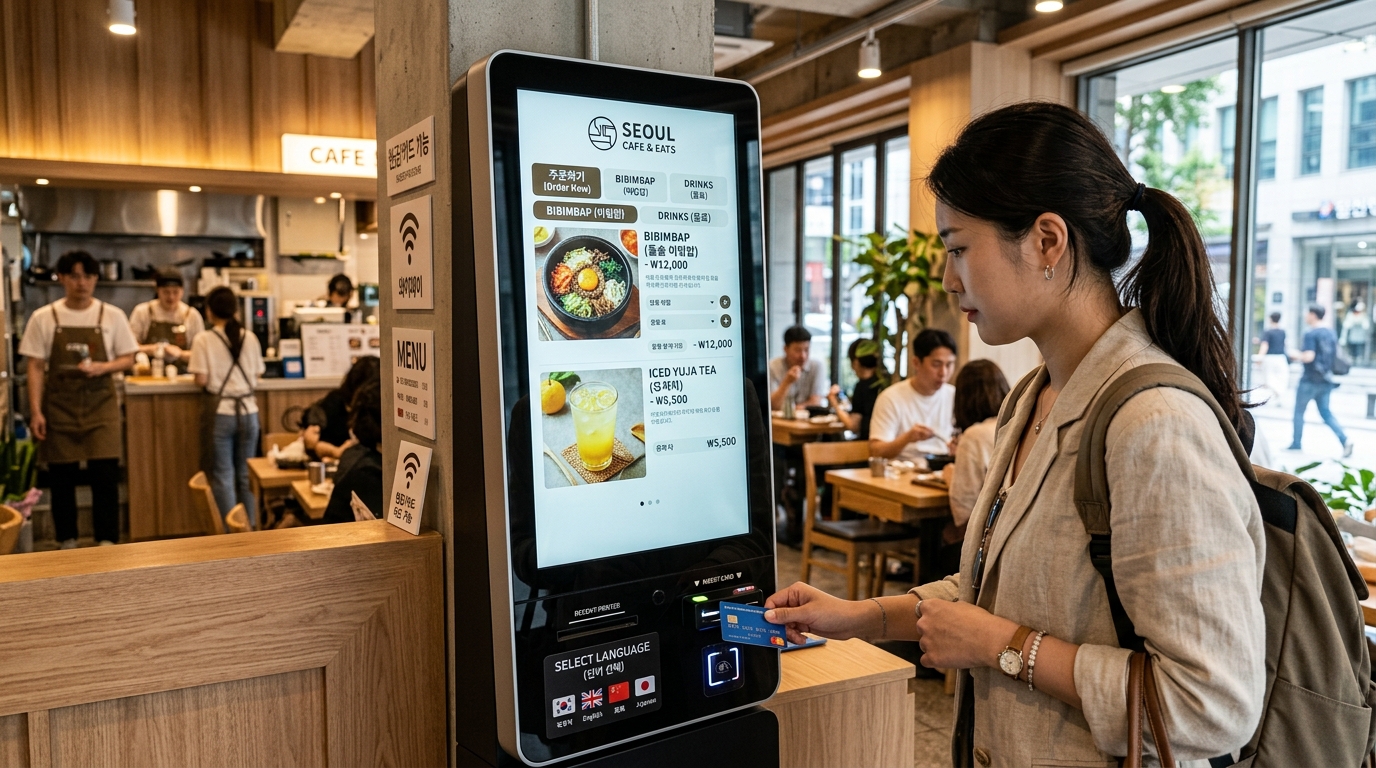
A standard self-service touchscreen kiosk in Seoul. Note the bottom IC card insertion slot and the NFC sensor pad.
1. The 4 Technical Reasons Your Card Fails at Korean Kiosks
Before looking at solutions, it helps to understand why a card that worked perfectly at Incheon Airport or your hotel suddenly gets declined at a lunch stall.
① The “Apple Pay & Contactless” Trap
In North America, Europe, and Australia, tapping your phone or contactless card on an NFC reader is second nature. In South Korea, however, Apple Pay was launched exclusively in partnership with Hyundai Card.
While major global convenience store chains (CU, GS25) and department stores have updated their NFC software to accept international Apple Pay cards, standard restaurant ordering kiosks almost never support foreign mobile wallets. When you tap your iPhone or Apple Watch on a kiosk NFC pad, the terminal cannot read your non-Korean bank token, resulting in an instant error.
② Inserting the IC Chip Upside-Down or Too Fast
Unlike Western terminals where cards often slide in horizontally or sideways, Korean kiosk card readers use vertical slots at the bottom or right side of the machine.
- The gold IC chip must face FORWARD and DOWNWARD into the reader.
- If you insert the card backward, or swipe the magnetic stripe on the side slit, the machine will reject the read.
- Pulling the card out before the screen says “영수증 출력중” (Printing Receipt) will abort the transaction mid-settlement.
③ Domestic Payment Gateways (PG) & DCC Timeouts
Many independent Korean restaurants and franchise coffee shops use domestic payment service providers (such as KICC EasyCheck, KIS Information & Communication, or NICE).
These lightweight kiosk software engines are designed to route transactions through Korean domestic networks (BC Card, KB Kookmin, Shinhan). When an international BIN number (from a Chase, Barclays, Wise, or Revolut card) is detected, the terminal attempts to query Dynamic Currency Conversion (DCC). If the international clearance server lags for more than 3 seconds, the kiosk simply aborts and flags a timeout decline.
④ Home Bank Anti-Fraud Triggers
If you didn’t set a travel notice on your banking app, automated fraud algorithms in the US or Europe will immediately flag a sudden $3.50 charge from “MEGA COFFEE GANGNAM” as suspicious activity and block international authorizations.
2. Kiosk vs. Store Acceptance: What Works Where?
Here is a practical breakdown of payment method reliability across automated self-service kiosks in Korea:
| Payment Method | Convenience Stores (CU/GS25) | Large Franchise Kiosks (McDonald’s/Shake Shack) | Local Chains (Mega Coffee/Gimbap) | Unmanned Ice Cream / Marts |
|---|---|---|---|---|
| Physical Visa / Mastercard (IC Chip) | ✅ 100% Working | ✅ 100% Working | ⚠️ 80% Working (Subject to PG) | ⚠️ 70% Working |
| Physical Wowpass / Namane Card | ✅ 100% Working | ✅ 100% Working | ✅ 100% Working (Domestic Network) | ✅ 100% Working |
| Apple Pay (Foreign Card / iPhone) | ✅ 95% Working | ✅ 80% Working | ❌ 10% Working (Mostly Fails) | ❌ 0% (Unsupported) |
| Wise / Revolut Physical Card | ✅ 100% Working | ✅ 90% Working | ⚠️ 75% Working | ⚠️ 65% Working |
| Alipay+ / WeChat Pay (QR Code) | ✅ 100% Working | ✅ 95% Working | ⚠️ 60% Working (If QR Camera Present) | ❌ Unsupported |
| Korean Won Cash (₩) | ✅ 100% Working | ⚠️ Counter Only (Most Kiosks Card-Only) | ⚠️ Counter Only | ⚠️ Some Bill Slots Only |
3. The 4 Guaranteed Fixes to Clear Payment
⚡ 10-Second Escalation Routine:
- Step 1: Check Chip Orientation ➔ Gold chip faces down and forward. Push all the way in and wait for the receipt prompt.
- Step 2: Use Wowpass / Namane ➔ If international Visa/Mastercard triggers Error 00/99, tap a domestic-routed prepaid card.
- Step 3: Counter Override ➔ Step to the pickup counter and show our Korean emergency card for manual multi-network POS clearing.
- Step 4: Pay with Cash ➔ Switch to ₩1,000 / ₩5,000 / ₩10,000 bills if the kiosk or counter accepts cash.
Fix 1: The Wowpass Card Solution (100% Local Network Bypass)
The single most reliable financial travel hack for South Korea is obtaining a Wowpass or Namane Card.
These are foreign-tourist prepaid cards that you load with foreign currency (USD, EUR, JPY, SGD, etc.) at airport and subway kiosks. Crucially, when a merchant or kiosk scans a Wowpass, it processes through the Korean domestic BC Card payment network. Because the terminal sees it as a domestic Korean card, it never triggers DCC errors, never requires SMS OTP authentication, and is accepted at 100% of unmanned kiosks nationwide.
Fix 2: Clean the IC Chip & Re-Insert Deeply
Dust, pocket lint, or slight oxidation on your card’s gold contact chip can cause a read failure on sensitive Korean terminals. Rub the chip briskly on your sleeve and insert it firmly until you feel it click into the base of the reader. Leave it inside until the screen displays your order number.
Fix 3: The “Counter Override” Trick (Staff Terminal Bypass)
Almost every restaurant or cafe with a kiosk has a human POS terminal behind the pickup counter. Kiosks run on strict, automated validation rules, but the main cash register at the counter is connected to a primary multi-clearing bank terminal capable of manual overrides.
Step up to the counter, show your phone with the items you wanted to order, and present your physical card with the phrase card below.
4. Emergency Korean Showcards: Save to Your Phone
If the touchscreen freezes or repeatedly declines your international card, show these bilingual emergency cards directly to the staff:
📱 Showcard 1: When your card is declined at the kiosk
“키오스크에서 해외 카드 결제가 안 되는데, 여기서 결제해 주실 수 있나요?” (Kiosk-eseo hae-oe kadeu gyeolje-ga an doeneunde, yeogi-seo gyeolje-hae jusil su innayo?)
💬 Translation: “My international card is not going through on the kiosk. Could you please process the payment here at the counter?”
📱 Showcard 2: When you want to pay with cash
“키오스크가 카드 전용이라서요. 현금으로 결제할게요.” (Kiosk-ga kadeu jeon-yong-iraseoyo. Hyeon-geum-euro gyeolje-halgeyo.)
💬 Translation: “The kiosk is card-only. I would like to pay in cash at the counter.”
5. Frequently Asked Questions (FAQ)
Q1: Do Korean restaurant kiosks accept ₩50,000 bills?
Most modern dining kiosks in Seoul are completely cashless (“카드 전용” - Card Only). If a kiosk does have a cash acceptor, it typically accepts ₩1,000, ₩5,000, and ₩10,000 notes, but will reject ₩50,000 bills. For large notes, ask the counter staff for change first.
Q2: Does Wise or Revolut work on Korean kiosks?
Yes, physical Wise and Revolut cards work at roughly 75–80% of self-service kiosks. However, they may occasionally fail at smaller independent franchise kiosks whose domestic merchant gateway cannot establish a handshake with multi-currency debit routing. Carrying a Wowpass or backup physical credit card is essential.
Q3: Why does my physical card work at Olive Young but fail at a budget coffee shop?
Large corporate retailers like Olive Young, Musinsa, and Starbucks invest in enterprise payment infrastructure equipped with direct global Visa/Mastercard clearing pipelines and automated instant tax refund capabilities. Small coffee kiosks rely on lightweight, low-cost local POS providers that lack robust international processing capabilities.
Q4: Can I use Google Pay or Samsung Pay with a foreign card?
Samsung Pay only functions on Korean kiosks if paired with a domestic Korean credit or debit card. Foreign Google Pay and Samsung Pay configurations experience the same NFC compatibility barrier as foreign Apple Pay. Always keep a physical plastic card in your wallet while exploring Korea.
Planning Your Korea Trip? Compare Your Options
Compare transport, mobile data, and attraction options. Prices and eligibility depend on your selected date and package.
AREX Incheon ↔ Seoul Express
Express train between Incheon Airport and Seoul Station. Follow the selected voucher’s seat reservation and redemption instructions.
Check AREX Express Tickets →Korea eSIM Options
Compare Korea eSIM search results. Check data allowance, supported network, device compatibility, activation, and speed limits.
Compare Korea eSIM Options →WOWPASS Card (Pay + T-Money)
Compare WOWPASS and T-money. Payment and transit balances are separate; check issuance, top-up, exchange, and withdrawal fees.
Read WOWPASS vs T-money →Top Seoul Passes & Day Tours
Browse general Seoul activity search results. This is not a guaranteed-entry pass or a fixed-discount offer; check each product’s inclusions.
Browse Seoul Activity Options →Sources
- Korea Financial Telecommunications & Clearings Institute
- BC Card / Wowpass Official Guidelines
- Hyundai Card Apple Pay Merchant Network
Search-trend data from Google Trends (KR) and Naver DataLab. This article is independent commentary and is not affiliated with any broadcaster, agency, or the individuals mentioned.